
# Loading 2 R libraries to illustrate
library(tidyverse)
library(nycflights13)
Note
Language coverage: All executable code in Sections 1–4 is R and runs live in this notebook. Equivalent Julia (DataFrames.jl) syntax is shown alongside each example for reference but is not executed. A fully worked, copy-paste-ready Stata example appears in Section 7.
1 Keys: the foundation of every join
Every join connects two tables through a pair of keys.
- A primary key uniquely identifies each row in a table. It may be a single variable or a compound key (multiple variables together).
- A foreign key references the primary key of another table.
In the nycflights13 package, for example, we have tables planes, flights and airlines:
head(select(planes,tailnum,year,model),3)# A tibble: 3 × 3
tailnum year model
<chr> <int> <chr>
1 N10156 2004 EMB-145XR
2 N102UW 1998 A320-214
3 N103US 1999 A320-214 and flights
flights |>
  select(tailnum,year,month,day) |>
  arrange(tailnum) |>
  head(3)
# A tibble: 3 × 4
tailnum year month day
<chr> <int> <int> <int>
1 D942DN 2013 2 11
2 D942DN 2013 3 23
3 D942DN 2013 3 24planes$tailnumis the primary key ofplanes;flights$tailnumis a foreign key pointing to it.- similarly for
airlines$carrier, which is the primary key ofairlines;flights$carrieris the foreign key. weatheruses the compound primary key(origin, time_hour).
1.1 Always verify key uniqueness
Before joining, check that the variable you intend to use as a key is actually unique on the side where you expect it to be:
planes |>
  count(tailnum) |>
  # any tailnum occuring more than once?
  filter(n > 1) |>
  # Should return 0 rows
  nrow()
[1] 0# Compound key check
weather |>
count(time_hour, origin) |>
# any combo (time,origin) occuring more than once?
filter(n > 1) |>
nrow() # same[1] 0Also check for missing values — a missing key cannot identify an observation:
planes |>
  filter(is.na(tailnum)) |>
  nrow()
[1] 0
Warning
Common mistake: assuming a variable is a unique key without checking. Duplicate keys on the wrong side are the root cause of most unintended many-to-many explosions.
2 How joins work: a visual model
We will use two small tables throughout this section. The key column in x takes values 1, 2, 3; in y it takes values 1, 2, 4. Key 3 exists only in x; key 4 only in y.
# tribble() builds a small data frame row-by-row;
# column names are prefixed with ~ (tilde)
x <- tribble(
  ~key, ~val_x,
     1, "x1",
     2, "x2",
     3, "x3"
)
y <- tribble(
  ~key, ~val_y,
     1, "y1",
     2, "y2",
     4, "y3"
)
x   # print x — 3 rows, keys 1/2/3
# A tibble: 3 × 2
key val_x
<dbl> <chr>
1 1 x1
2 2 x2
3 3 x3 y # print y — 3 rows, keys 1/2/4# A tibble: 3 × 2
key val_y
<dbl> <chr>
1 1 y1
2 2 y2
3 4 y3
NoteJulia
using DataFrames

x = DataFrame(key = [1, 2, 3], val_x = ["x1", "x2", "x3"])
y = DataFrame(key = [1, 2, 4], val_y = ["y1", "y2", "y3"])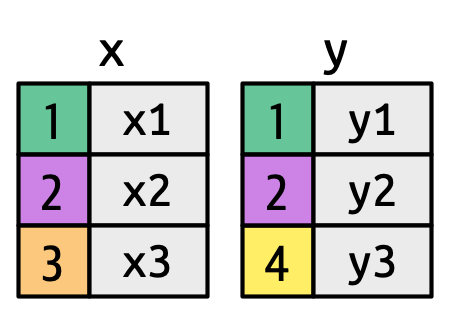
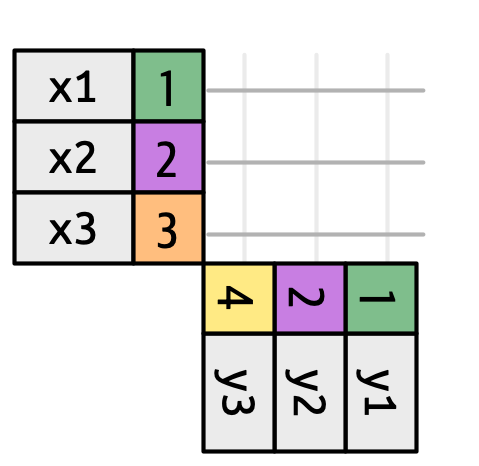
To reason about any join, imagine a grid of all possible matches between every row of x and every row of y. The join type then determines which intersections become actual rows in the output.
3 The four standard join types
3.1 Inner join
Keeps only rows where the key appears in both tables. Unmatched rows from either side are silently dropped.
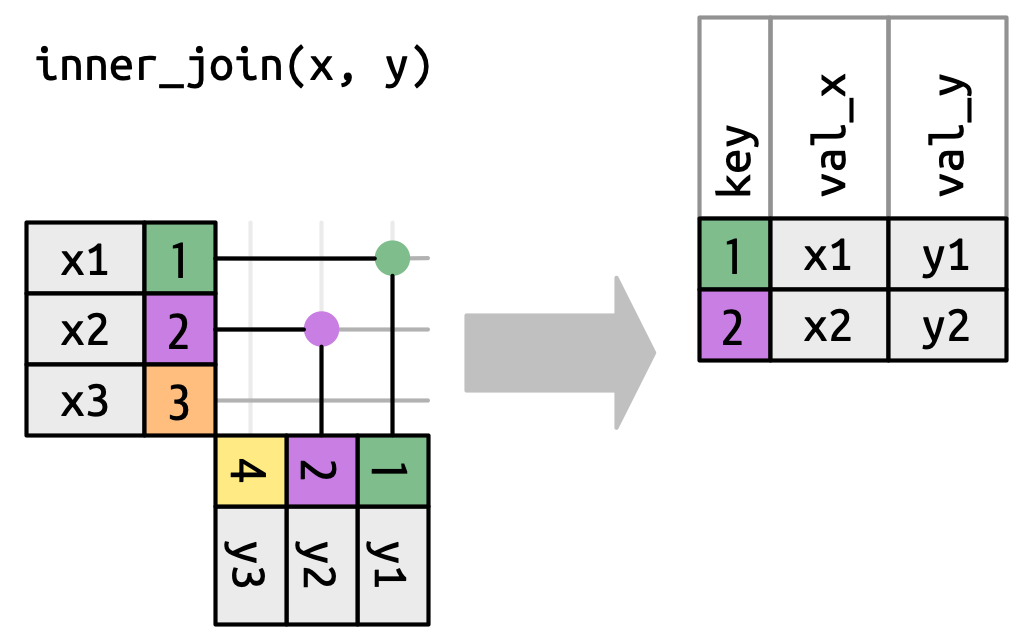
x |> inner_join(y, join_by(key))# A tibble: 2 × 3
key val_x val_y
<dbl> <chr> <chr>
1 1 x1 y1
2 2 x2 y2
NoteJulia
innerjoin(x, y, on = :key)| SQL | Stata | R (dplyr) | Julia (DataFrames.jl) |
|---|---|---|---|
INNER JOIN |
merge …; keep if _merge == 3 |
inner_join() |
innerjoin() |
3.2 Left join
Keeps all rows from x. Where there is no match in y, value columns from y are filled with NA (Stata: .).
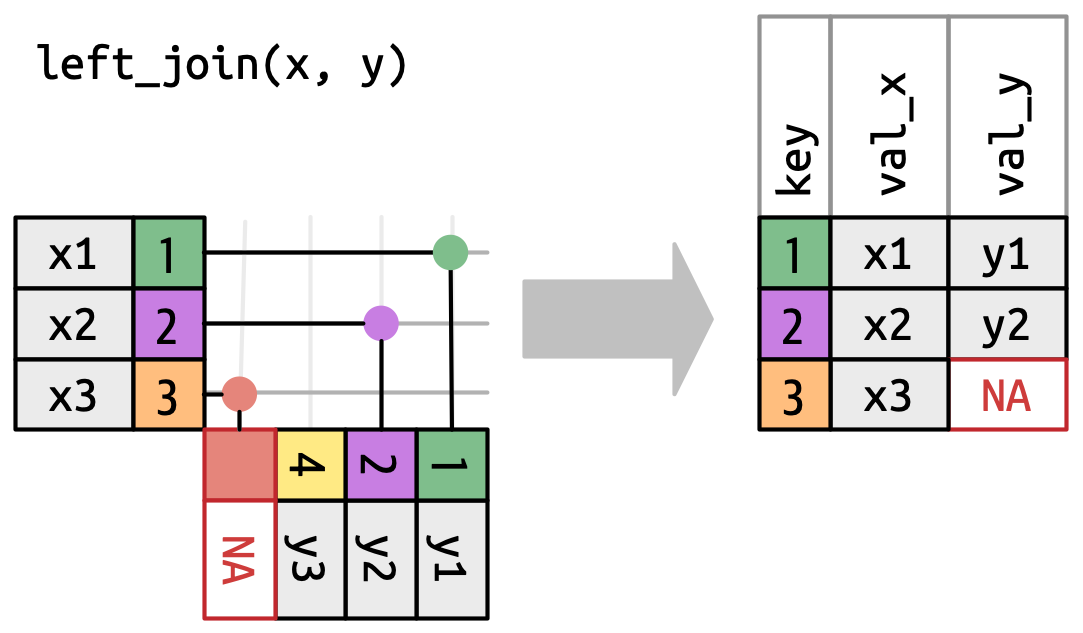
x |> left_join(y, join_by(key))# A tibble: 3 × 3
key val_x val_y
<dbl> <chr> <chr>
1 1 x1 y1
2 2 x2 y2
3 3 x3 <NA>
NoteJulia
leftjoin(x, y, on = :key)| SQL | Stata | R (dplyr) | Julia (DataFrames.jl) |
|---|---|---|---|
LEFT OUTER JOIN |
merge …; keep if _merge != 2 |
left_join() |
leftjoin() |
3.3 Right join
Keeps all rows from y. Unmatched rows from y get NA for the x columns.
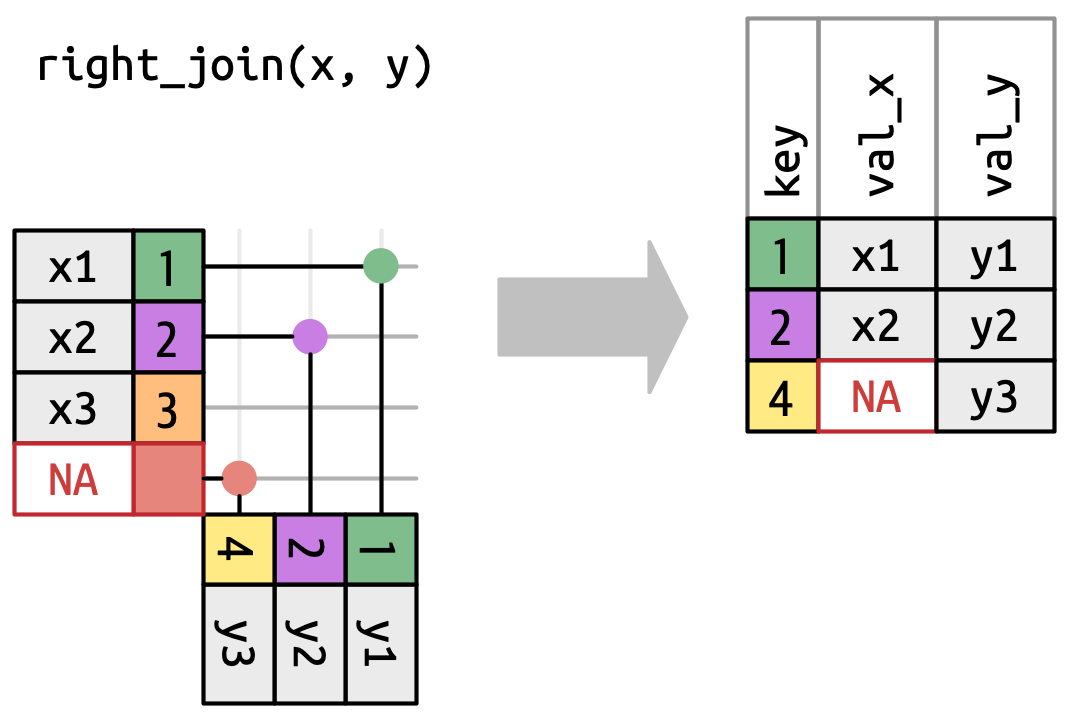
x |> right_join(y, join_by(key))# A tibble: 3 × 3
key val_x val_y
<dbl> <chr> <chr>
1 1 x1 y1
2 2 x2 y2
3 4 <NA> y3
NoteJulia
rightjoin(x, y, on = :key)| SQL | Stata | R (dplyr) | Julia (DataFrames.jl) |
|---|---|---|---|
RIGHT OUTER JOIN |
merge …; keep if _merge != 1 |
right_join() |
rightjoin() |
3.4 Full join
Keeps all rows from both tables. Unmatched rows get NA on the side with no match. This is Stata’s default merge behavior.
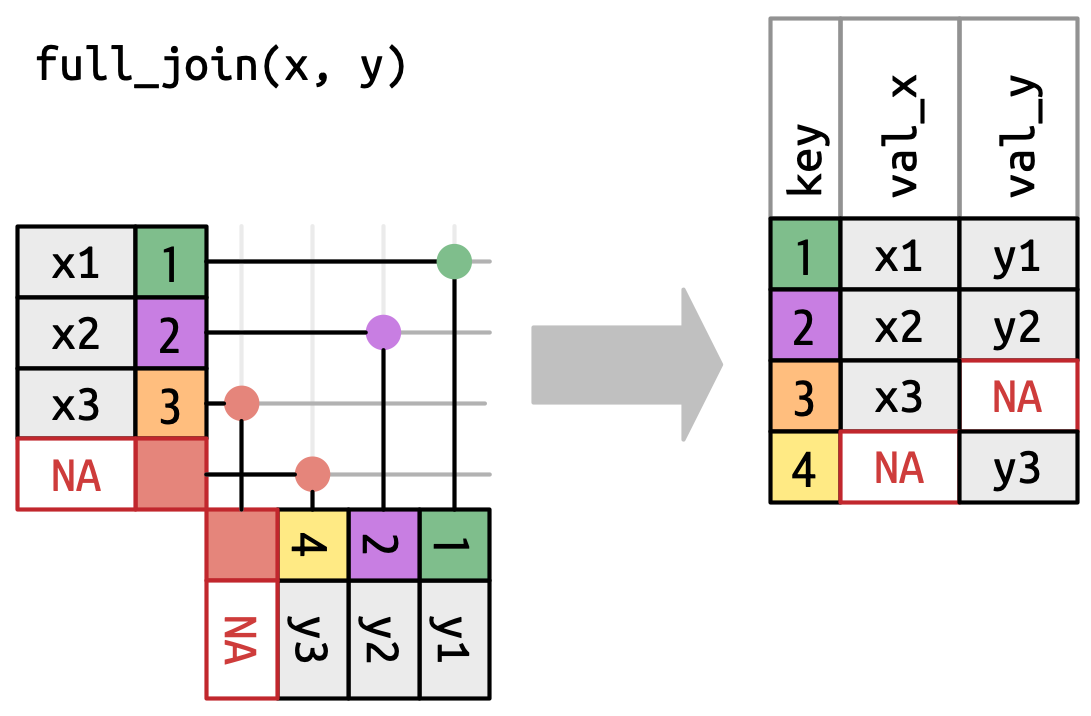
x |> full_join(y, join_by(key))# A tibble: 4 × 3
key val_x val_y
<dbl> <chr> <chr>
1 1 x1 y1
2 2 x2 y2
3 3 x3 <NA>
4 4 <NA> y3
NoteJulia
outerjoin(x, y, on = :key)| SQL | Stata | R (dplyr) | Julia (DataFrames.jl) |
|---|---|---|---|
FULL OUTER JOIN |
merge … (default, keep all) |
full_join() |
outerjoin() |
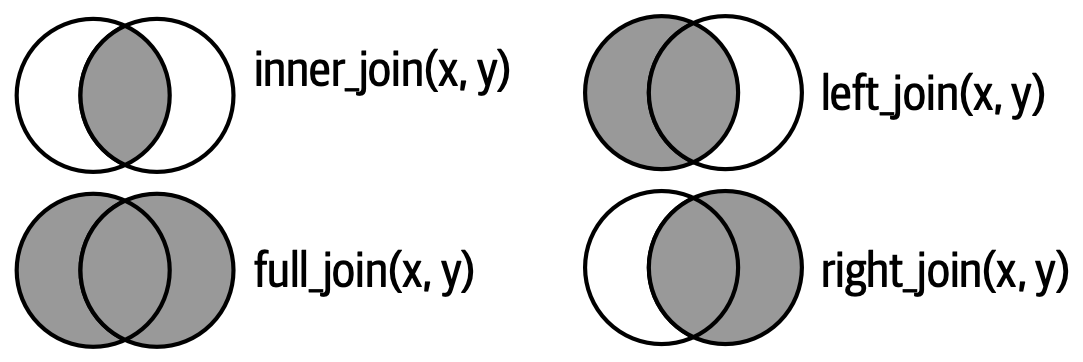
3.5 Venn diagram summary
A useful (though imperfect) memory aid. It correctly shows which rows survive but does not illustrate what happens to columns from the non-surviving side.
3.6 Filtering joins
These don’t add columns — they just filter rows based on whether a match exists.
Semi-join: keeps rows in x that have at least one match in y. No columns from y are added.
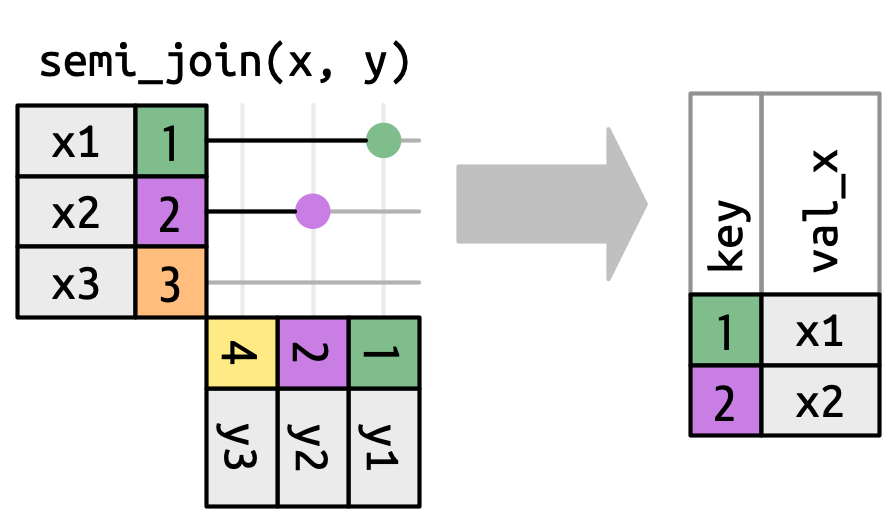
x |> semi_join(y, join_by(key))# A tibble: 2 × 2
key val_x
<dbl> <chr>
1 1 x1
2 2 x2
NoteJulia
semijoin(x, y, on = :key)Anti-join: keeps rows in x that have no match in y. Excellent for diagnosing unmatched observations.
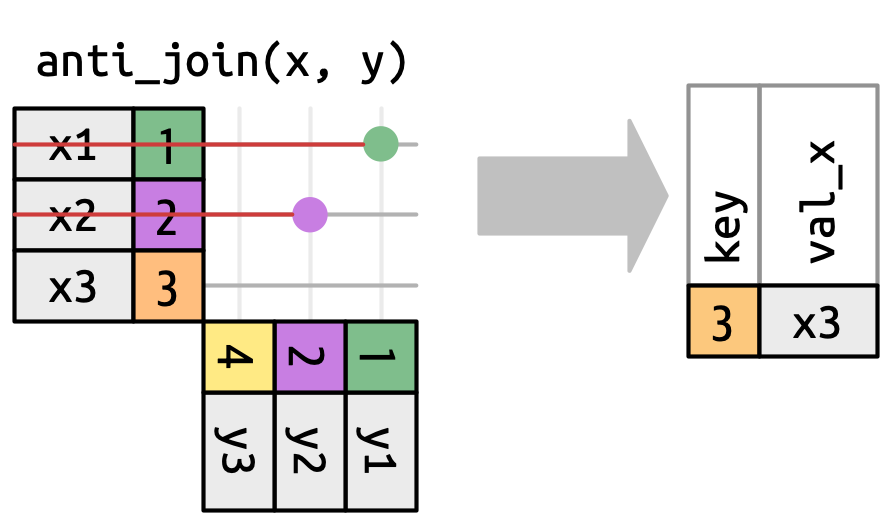
x |> anti_join(y, join_by(key))# A tibble: 1 × 2
key val_x
<dbl> <chr>
1 3 x3
NoteJulia
antijoin(x, y, on = :key)4 Row matching and cardinality
What happens when a key value appears more than once on one side?
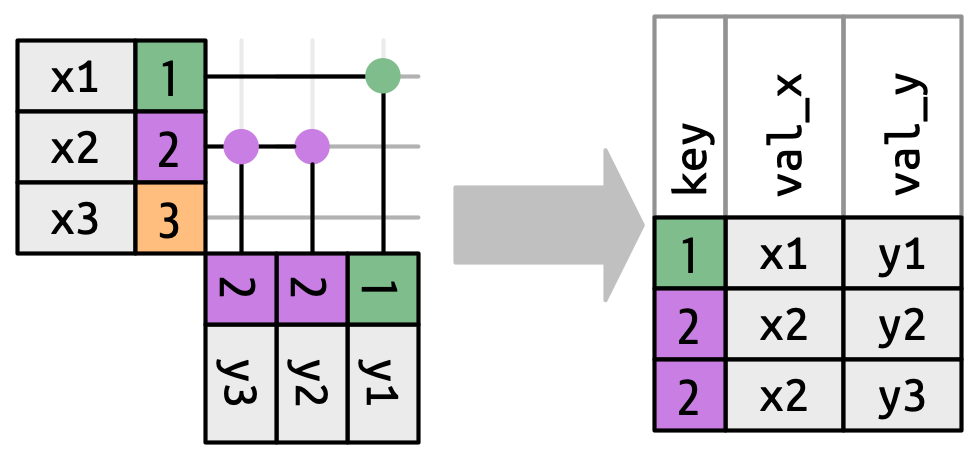
Three outcomes are possible for a row in x:
- Zero matches → dropped (in inner/left joins: kept with NAs for outer joins)
- One match → preserved as-is
- Multiple matches → duplicated once per match
The dangerous case is when both sides have duplicates on the key. With 3 rows for key=2 in x and 3 rows for key=2 in y, a relational join produces 3 × 3 = 9 rows for that key group alone. dplyr warns you:
df1 <- tibble(key = c(1, 2, 2), val_x = c("x1", "x2", "x3"))
df2 <- tibble(key = c(1, 2, 2), val_y = c("y1", "y2", "y3"))

df1 |> inner_join(df2, join_by(key))
Warning in inner_join(df1, df2, join_by(key)): Detected an unexpected many-to-many relationship between `x` and `y`.
ℹ Row 2 of `x` matches multiple rows in `y`.
ℹ Row 2 of `y` matches multiple rows in `x`.
ℹ If a many-to-many relationship is expected, set `relationship =
"many-to-many"` to silence this warning.# A tibble: 5 × 3
key val_x val_y
<dbl> <chr> <chr>
1 1 x1 y1
2 2 x2 y2
3 2 x2 y3
4 2 x3 y2
5 2 x3 y3 | Key uniqueness | Name | Output rows | Risk |
|---|---|---|---|
| Unique on both sides | 1:1 | ≤ matched rows | Low |
| Unique on x, duplicates on y | 1:m | = rows in y (matched keys) | Low |
| Duplicates on x, unique on y | m:1 | = rows in x (matched keys) | Low |
| Duplicates on both sides (relational) | m:m | = Cartesian product per group | Verify intent |
Stata’s merge m:m |
positional | = max(n_x, n_y) per group | Critical |
5 Stata’s merge command
Stata’s merge is a full outer join by default. The _merge indicator it creates tells you the match status of each row:
_merge value |
Meaning | SQL analogy |
|---|---|---|
1 — master only |
Row in left dataset, no match in right | Left outer, unmatched |
2 — using only |
Row in right dataset, no match in left | Right outer, unmatched |
3 — matched |
Row matched in both datasets | Inner join result |
The merge type prefix declares the expected key cardinality. Stata will error if the data violates the declared cardinality — which is a useful safeguard:
* 1:1 — key unique on BOTH sides
merge 1:1 firm_id year using "balance_sheet.dta"

* m:1 — key may repeat in master, unique in using
*       (adding region-level attributes to a firm-year panel)
merge m:1 region_id using "region_controls.dta"

* 1:m — unique in master, may repeat in using
merge 1:m firm_id using "patents.dta"

* Controlling what rows to keep after the merge
keep if _merge == 3   // inner join
keep if _merge != 2   // left join
keep if _merge != 1   // right join
drop _merge           // always drop _merge when done
Tip
Best practice: always inspect _merge after every merge. Use assert _merge == 3 if you expect a perfect match, or tab _merge to check for unexpected non-matches. Never leave _merge in the working dataset without examining it.
6 The merge m:m problem
Important
merge m:m is not a relational join
Despite the name, merge m:m in Stata does not produce the Cartesian product of matching key groups. It performs positional row-matching within key groups: it pairs rows by their position after sorting by the key variable — 1st row with 1st row, 2nd with 2nd, and so on.
This is almost certainly not what the author intended, and its output depends silently on the sort order of the data.
6.1 A concrete example
Suppose both datasets have multiple rows for firm_id = 42:
Master (employees.dta):
| firm_id | employee |
|---|---|
| 42 | Alice |
| 42 | Bob |
| 42 | Carol |
Using (contracts.dta):
| firm_id | contract |
|---|---|
| 42 | C-001 |
| 42 | C-002 |
| 42 | C-003 |
6.1.1 What merge m:m actually produces
Stata pairs by position within the key group:
merge m:m firm_id using "contracts.dta"| firm_id | employee | contract | How? |
|---|---|---|---|
| 42 | Alice | C-001 | 1st ↔︎ 1st |
| 42 | Bob | C-002 | 2nd ↔︎ 2nd |
| 42 | Carol | C-003 | 3rd ↔︎ 3rd |
Alice is matched to C-001 not because of any meaningful relationship between them, but because both happen to be first in their respective files. Re-sort either dataset before the merge and you get a different result.
6.1.2 What a true m:m (relational) join produces
joinby in Stata, or inner_join() in R when both sides have duplicates, produces the full Cartesian product — every combination:
| firm_id | employee | contract |
|---|---|---|
| 42 | Alice | C-001 |
| 42 | Alice | C-002 |
| 42 | Alice | C-003 |
| 42 | Bob | C-001 |
| 42 | Bob | C-002 |
| 42 | Bob | C-003 |
| 42 | Carol | C-001 |
| 42 | Carol | C-002 |
| 42 | Carol | C-003 |
Nine rows, not three. The merge m:m result is neither a relational join nor a documented data transformation — it is a positional artifact.
6.2 Why this is a critical reproducibility issue
Important
The output of merge m:m is sort-order dependent. Two researchers running the same code on data with different sort histories may get different results — even with identical _merge == 3 counts. The code is logically wrong even when results happen to replicate.
7 Worked Stata example: merge m:m vs joinby
The script below is self-contained and copy-paste ready: it builds the datasets from scratch using input, runs both the wrong and the correct merge, and cleans up after itself. No external .dta files are needed.
7.1 Step 1 — Build the two datasets
clear all
set more off

* --- employees.dta -----------------------------------------------------------
input str10 firm_id str8 employee
    "firm_42"   "Alice"
    "firm_42"   "Bob"
    "firm_42"   "Carol"
    "firm_99"   "Dave"
end

label var firm_id  "Firm identifier"
label var employee "Employee name"

save employees.dta, replace

* --- contracts.dta -----------------------------------------------------------
clear
input str10 firm_id str8 contract
    "firm_42"   "C-001"
    "firm_42"   "C-002"
    "firm_42"   "C-003"
    "firm_99"   "D-001"
end

label var firm_id  "Firm identifier"
label var contract "Contract reference"

save contracts.dta, replace
7.2 Step 2 — The wrong way: merge m:m
Stata pairs rows by position within each key group after sorting. The result depends entirely on the current sort order of both files — it is not a relational join.
use employees.dta, clear

display as text _newline ///
    "================================================" _newline ///
    "  WRONG: merge m:m (positional row-pairing)"     _newline ///
    "================================================"

merge m:m firm_id using contracts.dta

* Alice→C-001, Bob→C-002, Carol→C-003 — purely positional.
* Re-sort either file and you get different pairs.
list firm_id employee contract _merge, sepby(firm_id) noobs


  +---------------------------------------------+
  | firm_id   employee   contract        _merge |
  |---------------------------------------------|
  | firm_42      Alice      C-001   Matched (3) |
  | firm_42        Bob      C-002   Matched (3) |
  | firm_42      Carol      C-003   Matched (3) |
  |---------------------------------------------|
  | firm_99       Dave      D-001   Matched (3) |
  +---------------------------------------------+


* All _merge == 3 gives false confidence that the merge "worked"
tab _merge

   Matching result from |
                  merge |      Freq.     Percent        Cum.
------------------------+-----------------------------------
            Matched (3) |          4      100.00      100.00
------------------------+-----------------------------------
                  Total |          4      100.00
7.3 Step 3 — Demonstrating sort-order dependence
* Reverse the order of contracts for firm_42 and re-run.
* The employee-contract pairs change — even though _merge is still all 3s.

use contracts.dta, clear
gsort firm_id -contract          // reverse alphabetical order within firm
save contracts_reversed.dta, replace

use employees.dta, clear

display as text _newline ///
    "================================================"         _newline ///
    "  WRONG: merge m:m after reversing contracts"             _newline ///
    "  (same _merge=3, completely different pairs!)"           _newline ///
    "================================================"

merge m:m firm_id using contracts_reversed.dta

* Now Alice→C-003, Bob→C-002, Carol→C-001
* The 'result' changed just because we re-sorted the using file.
list firm_id employee contract _merge, sepby(firm_id) noobs

  +---------------------------------------------+
  | firm_id   employee   contract        _merge |
  |---------------------------------------------|
  | firm_42      Alice      C-003   Matched (3) |
  | firm_42        Bob      C-002   Matched (3) |
  | firm_42      Carol      C-001   Matched (3) |
  |---------------------------------------------|
  | firm_99       Dave      D-001   Matched (3) |
  +---------------------------------------------+
7.4 Step 4 — The right way: joinby
joinby produces the true relational many-to-many join: the full Cartesian product within each key group. Every (employee, contract) combination appears exactly once, and the result does not depend on sort order.
use employees.dta, clear

display as text _newline ///
    "================================================" _newline ///
    "  CORRECT: joinby (Cartesian product per group)" _newline ///
    "================================================"

joinby firm_id using contracts.dta

list firm_id employee contract, sepby(firm_id) noobs

  +-------------------------------+
  | firm_id   employee   contract |
  |-------------------------------|
  | firm_42      Alice      C-002 |
  | firm_42      Alice      C-001 |
  | firm_42      Alice      C-003 |
  | firm_42        Bob      C-002 |
  | firm_42        Bob      C-003 |
  | firm_42        Bob      C-001 |
  | firm_42      Carol      C-001 |
  | firm_42      Carol      C-003 |
  | firm_42      Carol      C-002 |
  |-------------------------------|
  | firm_99       Dave      D-001 |
  +-------------------------------+


* firm_42: 3 employees × 3 contracts = 9 rows  ✓
* firm_99: 1 employee  × 1 contract  = 1 row   ✓
7.5 Step 5 — What you probably actually wanted: merge 1:1 with a proper key
In most real cases, merge m:m signals a missing key variable. The data likely has a meaningful unique key you haven’t identified yet. Once you find it, use the appropriate typed merge:
* employees with explicit contract assignment
clear
input str10 firm_id str8 employee str8 contract_id
    "firm_42"   "Alice"   "C-001"
    "firm_42"   "Bob"     "C-002"
    "firm_42"   "Carol"   "C-003"
    "firm_99"   "Dave"    "D-001"
end
save employees_with_key.dta, replace

clear
input str10 firm_id str8 contract_id str20 contract_desc
    "firm_42"   "C-001"   "Software license"
    "firm_42"   "C-002"   "Consulting retainer"
    "firm_42"   "C-003"   "Hardware supply"
    "firm_99"   "D-001"   "Maintenance contract"
end
save contracts_with_key.dta, replace

use employees_with_key.dta, clear

display as text _newline ///
    "================================================"          _newline ///
    "  ALTERNATIVE: merge 1:1 once you identify the key"        _newline ///
    "================================================"

merge 1:1 firm_id contract_id using contracts_with_key.dta

list firm_id employee contract_id contract_desc _merge, sepby(firm_id) noobs

  +--------------------------------------------------------------------+
  | firm_id   employee   contra~d          contract_desc        _merge |
  |--------------------------------------------------------------------|
  | firm_42      Alice      C-001       Software license   Matched (3) |
  | firm_42        Bob      C-002    Consulting retainer   Matched (3) |
  | firm_42      Carol      C-003        Hardware supply   Matched (3) |
  |--------------------------------------------------------------------|
  | firm_99       Dave      D-001   Maintenance contract   Matched (3) |
  +--------------------------------------------------------------------+


assert _merge == 3   // all rows should match — error if not
7.6 Clean up
erase employees.dta
erase employees_with_key.dta
erase contracts.dta
erase contracts_reversed.dta
erase contracts_with_key.dta

display as text _newline "Done."| Command | Semantics | Output rows | Use when |
|---|---|---|---|
merge 1:1 |
Relational, unique key both sides | ≤ rows in master | Adding scalar attributes |
merge m:1 |
Relational, unique key on using side | = rows in master | Adding group-level vars to panel |
merge 1:m |
Relational, unique key on master side | ≥ rows in master | Expanding (e.g. firm → firm-product) |
joinby |
True m:m Cartesian join | = product of group sizes | Rarely; only when all combos are meaningful |
merge m:m |
Positional row-pairing ⚠️ | = max(n_x, n_y) per group | Almost never |
8 Quick reference
| SQL | Stata | R (dplyr) | Julia (DataFrames.jl) | Rows kept |
|---|---|---|---|---|
INNER JOIN |
merge …; keep if _merge==3 |
inner_join() |
innerjoin() |
Both sides matched |
LEFT OUTER JOIN |
merge …; keep if _merge!=2 |
left_join() |
leftjoin() |
All of master |
RIGHT OUTER JOIN |
merge …; keep if _merge!=1 |
right_join() |
rightjoin() |
All of using |
FULL OUTER JOIN |
merge … (default) |
full_join() |
outerjoin() |
All rows both sides |
WHERE EXISTS |
— | semi_join() |
semijoin() |
x rows with a match in y |
WHERE NOT EXISTS |
— | anti_join() |
antijoin() |
x rows with no match in y |
| Cartesian m:m | joinby |
(dplyr warns, use relationship="many-to-many") |
crossjoin() |
All combinations |
| ⚠️ Positional pairing | merge m:m |
— | — | Unpredictable — avoid |
Tip
Pre-merge checklist:
- Run
duplicates report [keyvar]on both datasets. - Choose the merge type that matches the actual cardinality.
- After merging, always inspect
_merge— never leave it unchecked. - Assert the expected outcome:
assert _merge == 3if all rows should match. - If you find
merge m:min someone else’s code: flag it.
9 Further reading
- Wickham H, Çetinkayer-Rundel M, Grolemund G (2023). R for Data Science (2e), Ch. 19 Joins. https://r4ds.hadley.nz/joins.html
- Stata manual:
help merge,help joinby - StataCorp (2023). Stata Base Reference Manual,
mergeentry — note the explicit warning againstmerge m:m
Citation
BibTeX citation:
@misc{oswald2026,
  author = {Oswald, Florian},
  title = {Merges and {Joins:} {From} {SQL} to {Stata}},
  date = {2026-03-18},
  url = {https://jpedataeditor.github.io/posts/20260318-merge/},
  langid = {en}
}
For attribution, please cite this work as:
Oswald, Florian. 2026. “Merges and Joins: From SQL to
Stata.” JPE Data Editor Blog (blog). March 18, 2026. https://jpedataeditor.github.io/posts/20260318-merge/.